
react冲浪机如何玩
安装与配置
确保已安装Node.js(建议版本16+)。通过以下命令创建React项目:
npx create-react-app surf-game
cd surf-game
npm install react-router-dom @react-three/fiber @react-three/drei
基础场景搭建
使用@react-three/fiber构建3D场景。在src/App.js中初始化一个简单场景:
import { Canvas } from '@react-three/fiber';
import { OrbitControls } from '@react-three/drei';

function App() {
  return (
    <Canvas>
      <ambientLight intensity={0.5} />
      <pointLight position={[10, 10, 10]} />
      <mesh position={[0, 0, 0]}>
        <boxGeometry args={[1, 1, 1]} />
        <meshStandardMaterial color="hotpink" />
      </mesh>
      <OrbitControls />
    </Canvas>
  );
}
export default App;
冲浪机模型与物理
-
加载模型:使用
useGLTF加载冲浪机3D模型(需将模型文件放入public/models目录):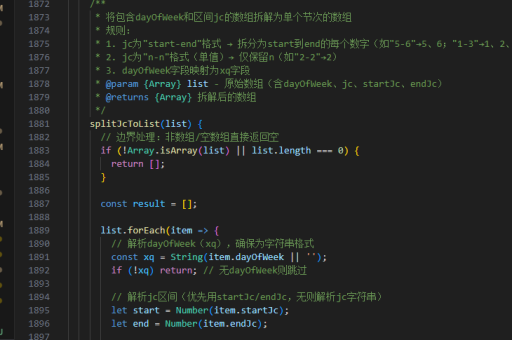
import { useGLTF } from '@react-three/drei'; function Surfboard() { const { nodes } = useGLTF('/models/surfboard.glb'); return <primitive object={nodes.board} />; } -
物理引擎:通过
useRapier添加物理效果(需安装@react-three/rapier):import { RigidBody } from '@react-three/rapier'; function PhysicsSurfboard() { return ( <RigidBody colliders="hull"> <Surfboard /> </RigidBody> ); }
波浪生成
使用着色器或噪声函数生成动态波浪。示例代码片段:
// 在着色器中应用噪声
float wave = sin(position.x * 0.2 + time) * 0.5;
position.y += wave;
控制逻辑
通过键盘事件控制冲浪机移动:
import { useKeyboardControls } from '@react-three/drei';
function Controls() {
  const [, get] = useKeyboardControls();
  useFrame(() => {
    const { forward } = get();
    if (forward) console.log('加速');
  });
}
运行与调试
启动开发服务器并测试效果:
npm start打开浏览器访问http://localhost:3000,使用WASD键控制冲浪机。
优化建议
- 使用
LOD优化远距离渲染 - 通过
useMemo缓存复杂计算 - 添加粒子特效模拟水花(如
@react-three/drei的Sparkles组件)





